
When your kid needs help with math and you, as a parent, aren’t able to teach them for whatever reason, you might think that a tutor is necessary. But there are apps that you can use to teach your kids math, from preschool all the way to high school, and they are often very fun, not to mention very helpful. Here’s a list a reader compiled. I’ll add ChatGPT has been very helpful for me when I needed help with my statistics homework.

Math tutoring runs $55 to $110 an hour in most areas, and the pressure to buy a package the moment your kid struggles is intense. But a well-chosen set of iPad apps can cover most of what a weekly tutor would, at a tiny fraction of the cost. Here is the stack we actually use, what each app costs, and where paid help is still worth it.
I have a habit of running the numbers before signing up for anything, and math support turned out to be one of the biggest line items I had to think carefully about. When my oldest hit a wall on multiplication and the school started gently suggesting outside help, the quotes I got from local tutors landed between $60 and $95 an hour. Even one session a week, factored across the school year, is a serious grocery budget.
Before I agreed to anything, I ran the same exercise I would run on any big expense: figure out what the actual problem is, price every option, and only pay where paying buys an outcome I cannot get for free. For most of what my kids needed in elementary math, an iPad app did the job better than a tutor would have. The whole stack costs us under $5 total.
The Pressure to Pay for Math Help Is Real
If your kid is behind on math facts, slow on long division, or avoiding math worksheets, there is no shortage of people ready to sell you a solution. Tutoring centres with contract packages. Private tutors through word of mouth. Learning pods that charge by the kid. Subscription math platforms that run $30 a month per child.
Some of that spending is genuinely useful. A lot of it is spending for reassurance. Paying $85 an hour for a tutor to drill multiplication facts your kid could practice on a tablet for free is spending for reassurance.
What helped us most was deciding to start with the free and low-cost options first, measure what actually improved, and only move up the ladder if the free options were not enough.
Step One: Figure Out What Your Kid Actually Needs
Before you download anything, name the problem specifically. “She is struggling with math” is not something an app can fix. “She cannot recall her 7s and 8s times tables fluently” is.
A few examples of problems where an iPad app is the right first move:
- Fact fluency, from addition through division. Repetition in a game wrapper beats flashcards and costs nothing extra.
- Keeping skills sharp over summer or school breaks.
- Independent practice while you deal with a younger sibling.
- A reluctant kid who refuses the workbook but will touch the iPad.
Problems where you probably do need something beyond an app: a learning disability assessment in progress, a specific concept the child is genuinely confused about and nobody at home can explain, or a high-school subject outside your comfort zone.
For my elementary-age kids, every single math problem has turned out to be in the first group. Apps did it. Here are the six we actually use.
1. MathHero (Free at 5 Levels a Day, Subscription Optional)
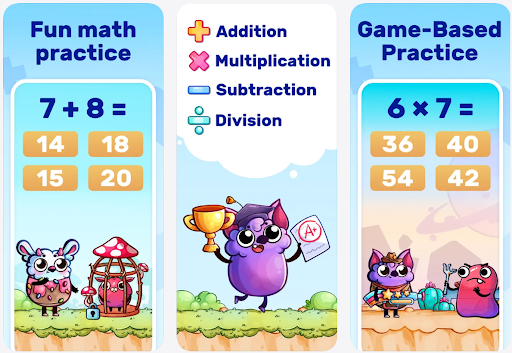
MathHero is the first app I open with a K-4 kid who needs math fact practice. It is a story-driven adventure where answering 11 + 8 launches an arrow at the monster, 8 + 8 fixes a race car, 2 + 2 opens a cage. The math is the gameplay, not something they do before the game starts.
Why it earned a spot in a frugal stack:
- The free tier is the whole game at 5 levels per day. No locked content, no ads. Five levels is about 10 to 15 minutes, which is roughly the right amount of practice for an elementary kid anyway.
- Each child gets their own profile with their own settings. One of mine is doing addition within 20, the other is grinding times tables. Same iPad, zero conflict.
- Works offline. Useful on a plane, in the car, or during the kind of Wi-Fi outage I cannot control.
- Covers addition, subtraction, multiplication, and division within 1000.
If your kid wants more than 5 levels a day, there is a subscription with a 7-day free trial (price depends on store and country, check the App Store listing before you commit). For us the free tier has been enough; we have never upgraded.
2. Khan Academy Kids (Fully Free, No Ads)
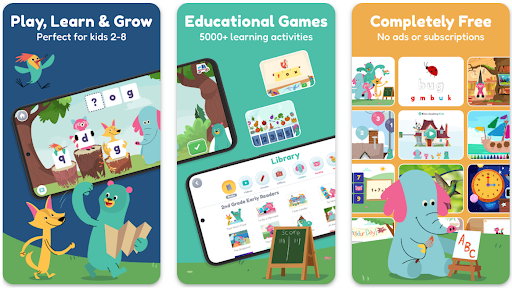
- Fully free, no ads, no in-app purchases. One of the very few major kids’ apps I know with all three.
- Pre-K to roughly first grade. The audio prompts walk a non-reader through everything.
- A gentle on-ramp if a tablet feels like too much for your 4-year-old.
3. Khan Academy (Fully Free, Grades 3 and Up)
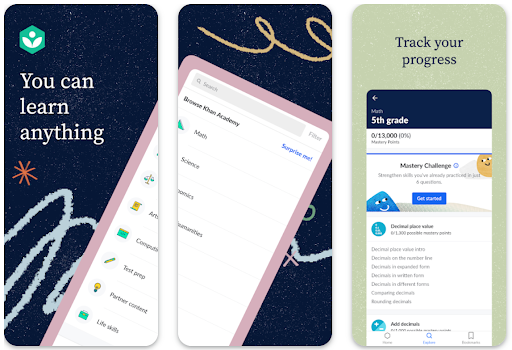
The main Khan Academy app, separate from Khan Academy Kids, covers math from early elementary through calculus. Short instructional videos, practice problems, mastery tracking. It is the same curriculum tens of thousands of homeschoolers use, and the same one that lives behind SAT prep. All of it, free, forever.
Where it fits in a budget stack:
- Grades 3 and up for math. Replaces an entire shelf of workbooks if your kid will sit through the videos.
- Mastery tracking lets you see where your kid is strong and where they need more work. Replaces a lot of what a tutor’s initial assessment would tell you.
- Zero cost. Khan Academy is a nonprofit funded by donations, not a freemium funnel. There is no “Khan Academy Plus” hiding behind the free tier.
The catch: a kid who hates sitting through video lessons will not love Khan Academy. For those kids, pair it with MathHero for the practice side and open Khan Academy only when they need an explanation of a new concept.
4. Prodigy Math (Free to Play, Premium Optional)
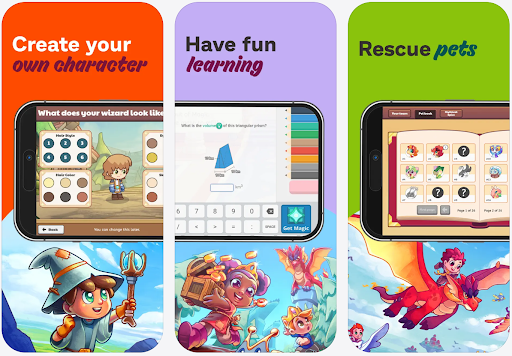
Prodigy is an RPG where your kid builds a wizard, fights monsters, and solves grade-appropriate math problems with every battle action. It is the app that gets reluctant kids to practice without complaint.
Frugal mom notes:
- The core game is genuinely free. All the math content, all the grade levels (1 through 8), the full world. A Premium Membership adds pets, outfits, and cosmetic unlocks but does not change the math itself (verify current pricing in the app).
- Adapts to the child based on a quick preassessment, then tunes problems to what they struggled with.
- The parent account sends weekly progress reports and lets you see what skills your child has been practicing.
The trade-off is attention economy. Prodigy is designed to be sticky and a kid will spend 10 minutes customizing an outfit before answering a single problem. I set a kitchen timer for 20 minutes, same as I do with any iPad app in our house.
5. Operation Math ($2.99, One-Time Purchase)
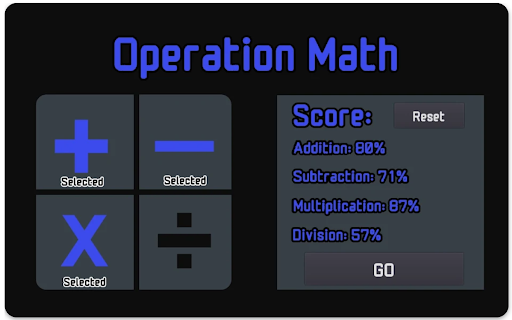
Operation Math is a $2.99 one-time purchase from Little 10 Robot (formerly Spinlight Studio, which published some of the best iPad math apps around back when apps still shipped as one-time purchases). Your kid is a spy; defeating Dr. Odd requires solving a stream of math problems within a timer. Addition, subtraction, multiplication, division, at selectable difficulty.
Why it earns a frugal recommendation:
- $2.99 forever, no subscription. In an app economy running on $9.99 monthly subscriptions, this is a rare and welcome structure.
- Fast-paced in a way that genuinely builds fact fluency. Our 3rd grader played 20 minutes of this before dinner for two weeks straight and her times tables jumped visibly.
- Over 100 “missions” of varying difficulty, so there is runway before boredom sets in.
Verify current App Store price before you buy. Little 10 Robot also makes YodelOh Math Mountain in the same $2.99 one-time category if your kid prefers an alpine carnival theme to spy missions.
6. Photomath (Free Tier Covers the Basics)
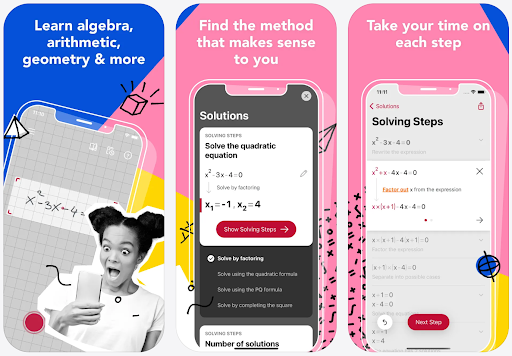
Photomath scans a handwritten or typed math problem through the iPad camera and shows the answer plus a step-by-step method. This is the “homework rescue” tool for the older-elementary and middle school years.
A few things to know before you install:
- The free tier covers most of what families need: scanning, basic steps, fundamental explanations.
- Photomath Plus is a paid subscription that adds animated tutorials (verify current price in-app). Skip it unless the free tier is genuinely not enough.
- Set the house rule up front: your kid uses Photomath after a real attempt, to check or to unstick, not as an answer machine. Used as a crutch, it hollows out learning. Used as a hint, it saves a 45-minute homework meltdown.
For a family dealing with modern math methods they do not recognize from their own schooling, this guide on what “new math” actually means is the clearest explainer I have found. It covers why the arrays, number lines, and partial products your kid is bringing home are not actually new, and how to help without having to re-teach yourself.
What the Whole Stack of iPad Apps Actually Costs Us
Here is a rough honest breakdown for our two elementary-age kids:
- MathHero free tier: $0, used daily.
- Khan Academy Kids: $0, fully free, forever.
- Khan Academy: $0, fully free, forever.
- Prodigy Math (no Premium): $0, fully free gameplay.
- Operation Math: $2.99 one-time, paid in 2024. Still in use.
- Photomath free tier: $0, used occasionally for homework.
Total hard spending across two years: $2.99.
Compare that to one weekly $75 tutoring session for ten months of the school year, which comes to roughly $3,000 per kid per year. For most of the problems a K-5 kid runs into with math, that difference is not justified by the outcome. It is justified by parental anxiety, which I understand, but which is the most expensive form of math help there is.
Where Paid Math Help Is Still Worth It
I am not against paying for math help. We just do not pay for it where an app will do.
Where we would still open the wallet:
- A diagnosed learning difference that needs a specialist.
- A specific concept the kid is genuinely stuck on and nobody at home can explain, after apps and free videos have been tried.
- High school math beyond the point where I can confidently check their work.
- A specific exam coming up (SAT, ACT, GCSE, ATAR) where the stakes justify targeted help in a narrow subject.
For everything else, the apps above have replaced what would have been thousands of dollars in tutoring over two years, and the kids are doing well.
The Bottom Line
Start free. Install MathHero and Khan Academy Kids (or Khan Academy proper, for older kids) today. Add Prodigy if your kid refuses to practice. Spend the $2.99 on Operation Math if you want a one-time purchase that still works five years from now. Keep Photomath on the home screen for homework emergencies.
If after a term of consistent daily practice your kid is still stuck on the same specific thing, then it is time to look at paid help. Not before. Budget-conscious parenting does not mean doing less for your kids. It means doing the right things with the resources you actually have.